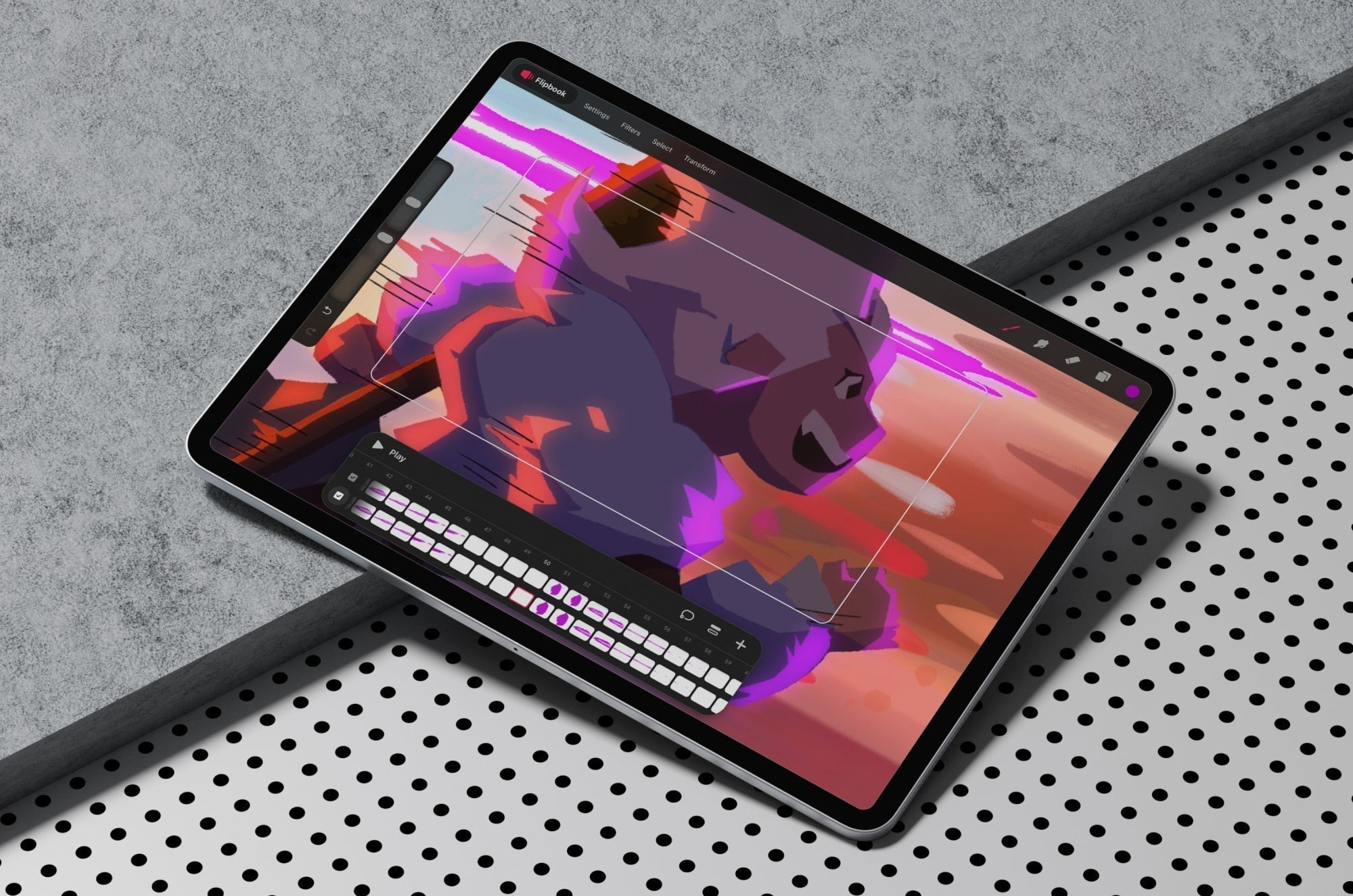

Animation on the iPad got a huge upgrade with the introduction of Procreate Dreams in 2023. It’s the 2D animation and motion design app from Savage Interactive, the company behind Procreate.
Its capabilities are robust, and you might find learning a completely new program intimidating, even if you're a Procreate user. If you're an animator, you might want to try this companion app and see how it could complement your existing knowledge and workflow.
These tutorials will come in handy. They're designed to help you at every skill level. Ready to bring your art to life in Procreate Dreams? Let's get started.
Getting started in Procreate Dreams
So you're thinking about using Procreate Dreams? Before you jump into tutorial videos, it can be helpful to check out the handbook. It's searchable and easy to follow.
There's also my deep dive article, which gives you a great review of the app from me, as an illustrator who has worked in Procreate for years.
Ready to learn? Styluses up!
Beginner tutorials
Starting from zero? No problem.
These tutorials will give you both a broad and in-depth overview of the app. You’ll bring simple illustrations to life and learn the key settings in step-by-step tutorials.
You don't need a background in Procreate or even illustration to follow along.

Intro to Procreate Dreams 2 by Procreate
Links: Watch here | Channel
Learning Objective: Get familiar with the main functions and features of Procreate Dreams 2.
Great for: Illustrators and animators.
Who better to learn about Procreate Dreams from than the Procreate team? They've made changes to the program since it launched in 2023. With this new update comes improvements to the timeline, Flipbooks, and more. You can also learn quick tips about the program from their Procreate Dreams Tips playlist.
The Procreate channel shares videos highlighting the creative community that loves and uses the app. They also create tutorials on using the program to create beautiful digital art and animation on the iPad.

Complete Beginners' Guide to Procreate Dreams 2.0 by Stefan Kunz
Links: Watch here | Channel
Learning Objective: An in-depth livestream overview of the Procreate Dreams 2 program with a simple illustration example.
Great for: Illustrators and animators.
If you really want your hand carefully guided through the Procreate Dreams 2 program, this is the tutorial for you. Since it was a livestream, Stefan's process isn't watered down and goes through each phase of creating the illustration and animation. This is a great workflow that showcases how Procreate Dreams leverages the Procreate brush engine.
Stefan Kunz is one of the most popular lettering artists around, who teaches lettering artists how to master hand lettering and calligraphy on the iPad. He also offers a variety of in-depth courses, ranging from lettering to animation.

Animate a diving board bounce by Ihabiano
Links: Watch here | Channel
Learning Objective: A simple diving board animation will teach you the basics of frame-by-frame animation.
Great for: Illustrators.
Embracing the basics is a great place to start when you're a beginner. This tutorial gives you a simple exercise of creating a bouncing diving board. Ihabiano explains his thought process along the way to get you to a place where you're ditching perfection and enjoying being a beginner.
Ihabiano is a YouTuber creating videos on art, design education, game design, and more.

5 Procreate Dreams 2 settings that make animation feel broken by Chamel Does Art
Links: Watch here | Channel
Learning Objective: Key Procreate Dreams 2 settings to help you understand why your animation may not look correct in playback.
Great for: Illustrators and animators.
How many times have you been stuck in a program, only for a setting you didn't know about to be the culprit? In this tutorial, Chamel will show you five common issues in Procreate Dreams and the settings you can adjust to fix them. This tutorial will help you smooth out laggy and jittery animations. Even if you haven't encountered these issues yet, it can be helpful to know about these settings in advance so you're ahead of the curve.
Chamel Does Art is a Japan-based artist who teaches other creatives while bridging the gap between traditional and digital art in Procreate and Procreate Dreams.

Singing frog animation by Uli-verse
Links: Watch here | Channel
Learning Objective: Draw a simple frog illustration in Procreate and animate its mouth singing a song in Procreate Dreams.
Great for: Illustrators and character designers.
Who knew you could learn from a singing frog? For the frog in this step-by-step tutorial, you'll create it using symmetry tools in Procreate and bring it into Procreate Dreams.
Uli-verse encourages you along the way, giving you advice on how to preview your animation and test things as you go. You'll also create a dynamic background so your singing frog can sing on a cute lily pad. You'll be provided with a sample music track in the description box, or you can use what you've learned to try your own music file.
Uli-verse is a creative learning channel where artists can learn animation in Procreate and Procreate Dreams.
Intermediate tutorials
Have a basic grasp of Procreate Dreams but want to move beyond the basics? These tutorials will give you a deeper look into animating in the app.
Learn how different techniques apply to Procreate Dreams from character design and narrative to visual effects.

Best way to lip sync in Procreate Dreams 2 by MFScrbblz
Links: Watch here | Channel
Learning Objective: Use Flipbooks to create a lip-synced animation.
Great for: Illustrators, character designers, and animators.
Lip-syncing is possible in Procreate Dreams thanks to its audio track integration. If you want to create a convincing lip-sync animation, you need to know the mouth shapes you'll need. Mitch’s short but effective tutorial shows what they are and the efficient workflow methods for animating them. Try this tutorial to animate a speaking sequence for your next character design.
Mitch Fernandez is an illustrator and animator who shares his creations and process across social media, including TikTok, YouTube, and Instagram.

Procreate Dreams - animation breakdown by Illusstream
Links: Watch here | Channel
Learning Objective: Use Perform to create a flying bird over a landscape.
Great for: Illustrators.
As you explore Procreate Dreams, you'll find that there are a lot of different ways to animate. This tutorial will show you how to use the Perform feature to create a flying bird animation.
Illustream goes into the breakdown of his Tracks and how he uses duplicated Flipbooks to incorporate frame-by-frame animations to support the final piece. If you have a nice landscape drawn, you can apply the concepts from this tutorial to your own animation.
Illustream is a concept artist focused on narrative-driven visuals and shares his process with other creatives.

Animating a face turn frame by frame by Timztoons
Links: Watch here | Channel
Learning Objective: Create a smooth face turn animation from rough sketch to final animation.
Great for: Illustrators, character designers, and animators.
Getting smooth transitions is key to character animation. In this tutorial, Timztoons shows you how to achieve a smooth face turn for an original character from rough sketch to finished animation.
It's great to see his techniques for using the Warp tool to manipulate parts of his character, so you don't have to redraw everything. He also shows how he colors and shades his character to give a polished final creation. You'll also see how he uses his own character on the outside of his canvas as a reference.
Timztoons is an animator and YouTuber sharing his animation process with other creatives through tutorials and livestreams.

How I animated jump on Procreate Dreams 2 by Enrirdf
Links: Watch here | Channel
Learning Objective: Animate a full-body character with Warp and Keyframes to create a dynamic jumping animation.
Great for: Illustrators, character designers, and animators.
This tutorial is a great way to learn how to animate an original character as it moves from the background to the foreground.
Enrico shows the beginning of his animation with a very stiff character, then how he manipulates the character's limbs to make it look like it's jumping. He shows how he starts by testing his keyframes before even creating the full jumping motion. He also has simple motion incorporated into other elements of his background to support the final animation.
Enrico is a graphic designer sharing his love for drawing and digital graphics on YouTube.

Handwriting animation in Procreate Dreams with color effect! by Jason Murray
Links: Watch here | Channel
Learning Objective: Mask and reveal parts of your illustration to create a write-on text effect.
Great for: Lettering artists, logo designers, and illustrators.
As a lettering artist, I think write-on text effects always look magical. They're a great way to make whatever lettering you have on your canvas look like it's being written stroke by stroke.
This tutorial takes that idea a step further by introducing a color-changing effect. Using the iconic Disney logo script as a sample, Jason shows you how to achieve this effect smoothly. He'll also show you how to group and organize your drawings and Tracks.
Jason Murray is an independent art director and creator sharing tutorials and advice for creatives on YouTube. He also runs The Toolbox, a resource to help creatives build their careers on their terms.
Advanced tutorials
You're an illustrator or animator who knows your way around Procreate Dreams well. You also have your animation fundamentals down and want a challenge.
These tutorials will give you more complex, in-depth concepts to expand your current skill set. You can use your animation knowledge to put your own spin on these tutorials and timelapses.
Enjoy creating visual effects for flying objects and water, and learning from the creative processes of other professional-level illustrators, painters, and animators.

Structuring complex aircraft animation without rigging by Ihabiano
Links: Watch here | Channel
Learning Objective: Learn the details of animating mechanical structures and flying objects without rigging.
Great for: Illustrators and animators.
This tutorial works around the rigging limitations in Procreate Dreams and instead uses the Flipbook for this technique.
Ihabiano goes through his thought process so that you can follow along with his idea. He also explains how he organizes his animation to keep things separate and easy to edit. This is critical because the animation has many different parts with multiple effects that combine keyframes and Flipbooks.
Ihabiano is a YouTuber creating videos on art, design education, game design, and more.

Creating the illusion of water in Procreate Dreams by Nikolai Lockertsen
Links: Watch here | Channel
Learning Objective: Create a realistic water illusion animation using a combination of Procreate and Procreate Dreams.
Great for: Illustrators, digital painters, and animators.
Animation can recreate the magic of everyday life. This tutorial is a masterful example of how to do just that with a water illusion.
In it, Nikolai shows you how to use Procreate alongside Procreate Dreams, leveraging each program's unique tools, features, and settings. He uses blend modes, tracks, warping, and more to animate the scene down to the floating water minerals. Use Procreate to prepare your illustrations before bringing the water to life in Procreate Dreams.
Nikolai Lockertsen is a freelance concept artist, illustrator, and animator with over 25 years of experience. You can find his animations in the Procreate Dreams program.

Procreate Dreams: Create amazing rocket shoes effect! by Artismia
Links: Watch here | Channel
Learning Objective: Use video footage as a base for a rocket shoe effect animation using frame-by-frame animation and Keyframes.
Great for: Illustrators, filmmakers, and animators.
Drawing isn't the only way to create dynamic animation in Procreate Dreams. You can also import your own video footage to start from and transform it along with your own illustrations.
This is the approach to the flying animation in this tutorial by Brandon of Artismia. If you like to film yourself or friends as references for your animations, this is a great way to use your footage. With a mix of frame-by-frame and keyframe animation, you can make it look like you're zooming across the screen.
Brandon of Artismia has over 30 years of professional experience as a painter, sculptor, animator, and educator. He shares tutorials on traditional and digital art on YouTube.

Procreate timelapse. How I made this animation by Michael Reith Art
Links: Watch here | Channel
Learning Objective: Watch Michael explain his approach to digital painting and animation in Procreate Dreams.
Great for: Illustrators and digital painters.
Being an expert in your field doesn't mean that everything will be perfect. Michael embraces this in his time-lapse explainer video. He explains his process, approach, and mindset to this digital painting and animation.
He goes through his motivation for creating the piece and his desire to try something more imaginative rather than purely observational. This made me ask myself when I last challenged my own creative thinking. Then he shows his animation from the rough sketch to the final line and cleanup. The result is a dreamlike animation with a panning movement, in which his character appears in the shot.
Michael Reith is a professional animator and illustrator who shares his process on YouTube and Patreon. You can find some of his commissioned animations in the Procreate Dreams app.

Learn 3D animation in Procreate Dreams | Part II by SKANimates
Links: Watch here | Channel
Learning Objective: Watch Simon go through his approach to creating a cinematic 3D scene in Procreate Dreams.
Great for: Illustrators, digital painters, and filmmakers.
Even with your drawings, you can achieve stunning cinematic realism in your animations. If you're still wondering how to do that in a realistic or new way, try Simon's approach in this tutorial.
This is a complex tutorial with many drawings, tracks, and effects. Thankfully, Simon gives you his files to follow along with if you're curious about how he organized his animation and brought it to life. Apply his expert use of perspective, keyframes, and effects to create a scene of your own.
Simon of SKANimates is an animator sharing his Procreate Dreams animation tutorials on YouTube.
Wrap up
Learning new skills like animation can be overwhelming.
But don't try to skip the basics. Enjoy being a beginner, master the simple things, and then move down the list. Trust me.
If you're already a Procreate user, you have a leg up, so you might not be as much of a beginner as you think. Either way, there's a lot to enjoy about Procreate Dreams, including the new specialty Animation brush library.
Sign up for the Paperlike newsletter to stay in the loop with the latest Procreate Dreams updates.